Watching a Block Get Built: How MySoloPool Shows You Real-Time Proof of Work
The Block Template card on MySoloPool is the most honest view of Bitcoin mining I have ever seen. It shows you the exact block your miner is trying to crack, the work being generated right now, and how fast your hashrate is actually trying.
Most people learn about Bitcoin mining from diagrams. Little boxes connected with arrows, a tiny pickaxe icon, and a sentence that says something like “miners hash until they find a valid nonce.” That’s not wrong, it’s just thin. When I first opened the Block Template card on the MySoloPool dashboard I realized — oh, this is what all those diagrams are gesturing at. You’re looking at the actual block. The one being worked on right now. The one your hardware is trying to beat.
This is easily my favorite teaching tool on the pool, and if you’ve been struggling to understand proof of work, go spend a few minutes on this card. It explains more than most articles, mine included.
The card, in plain English
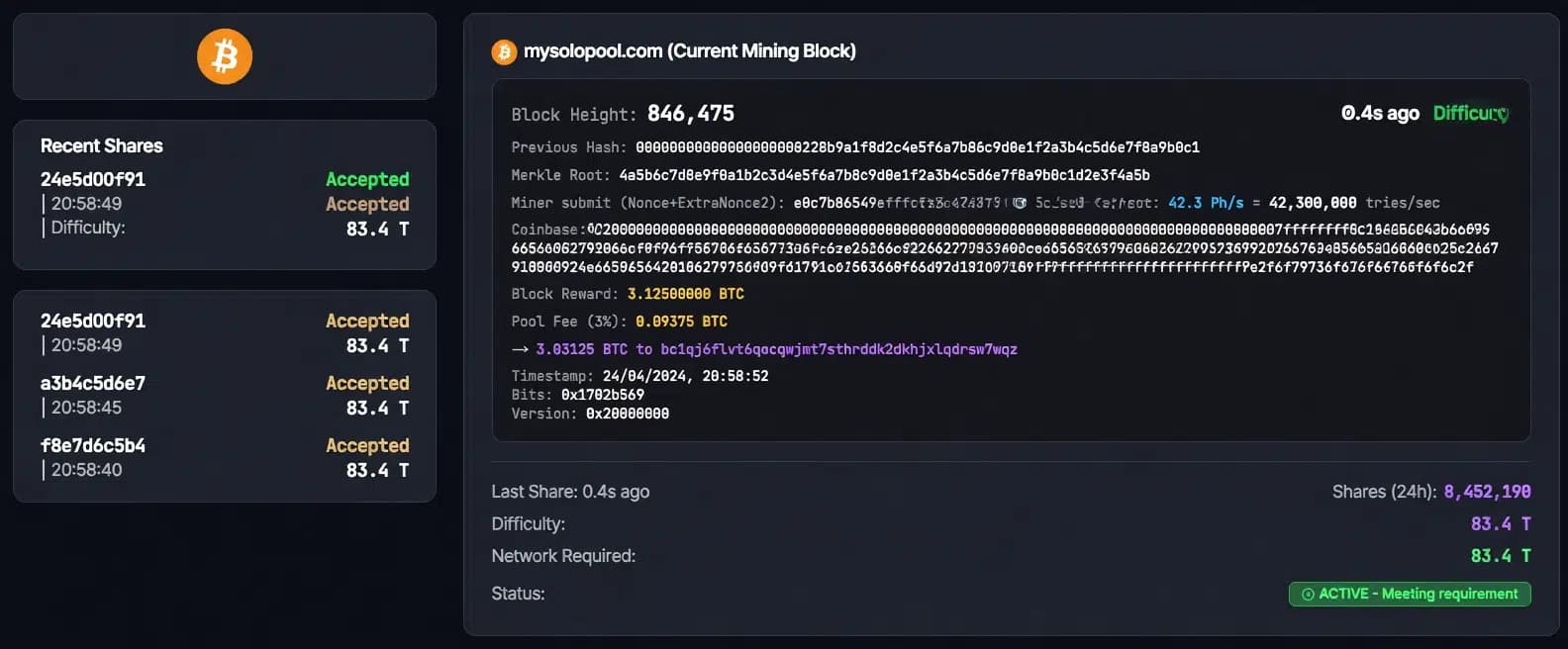
When you open your address on the MySoloPool dashboard and scroll down past the charts, you’ll find a card called Block Template (Current Mining Block). That card is the block your hashrate is currently pointed at. Not a demo. Not a cached image. The real candidate block, refreshed regularly from the node that feeds the pool.
The fields look a little cryptic at first, so let me walk through them the way I wish someone had walked me through the first time.
Block height: where we are on the chain
The first line shows block height — a number in the high 800,000s these days. That’s the position of the block on the Bitcoin blockchain. Every block has a height, like a page number. If the pool finds this one, that number is the page your name would be on. It is very strange to stare at a page number you might write into.
Previous hash: the chain itself
Next line is the previous hash. This is a long hexadecimal string that represents the last confirmed block on the network. The card shows it in full. That is the anchor you are building on. Every block in Bitcoin references the one before it by hash, which is exactly what makes it a chain. Change one, and everything after it becomes invalid. Seeing the actual previous hash on screen makes that concept stop being abstract.
Merkle root: the fingerprint of every transaction in the block
The merkle root is another hex string, but this one is built from all the transactions the pool plans to include in the block. If even one transaction changed — one satoshi, one signature — this hash would change. Without this, it would be trivial to swap transactions after the fact. With it, you’re locked in. The pool gives your miner this root as part of the work package so you’re always hashing against the exact same set of transactions.
Miner submit (Nonce + ExtraNonce2): this is the part that’s actually hashing
This is the line that hypnotizes everyone. It looks like a long hex string, and some of those characters are animating — flickering, cycling, green. Those green digits represent the part of the block that your miner is allowed to change. This is the space your ASIC is searching through.
In super simple terms, your machine takes the block header (version, previous hash, merkle root, timestamp, bits) and then keeps changing the nonce and extraNonce2 values, hashing each variation, and checking if the result is small enough to beat the network target. Your miner does this billions — or trillions — of times per second.
The animation on the card isn’t just for show. It’s illustrating the search space. Every flicker is essentially another attempt you could be making. When you see the characters cycle next to your hashrate, that rendered motion is the closest visual metaphor you’ll get to what mining actually does.
Current hashrate and the “tries per second” description
Right next to the animated part, the card shows your current hashrate and translates it into something human. For example: 300 TH/s = 300,000,000,000,000 tries/sec (300 trillion tries to solve the block).
Reading that line for the first time genuinely changes how you think about mining. You’re not solving one clever puzzle per share. You’re trying an astronomical number of guesses per second, and even that is a thin fraction of the trillions upon trillions of guesses the whole network is doing at the same moment. It makes the lottery analogy click.
Coinbase transaction and where the reward actually lands
Below that, the card shows the coinbase transaction, which is the special first transaction in every block. It creates new BTC and assigns it to the miner. In the MySoloPool block template, your Bitcoin address is literally appended at the end of the coinbase data — highlighted in purple. This is the on-chain proof that, if this block is found, the reward goes to you.
The card also explicitly splits the reward: the total block value, the pool fee, and what would actually be sent to your address. Since MySoloPool is a solo pool, there is no proportional payout game. If this block gets solved by your hashrate, that block reward — minus the disclosed fee — goes to the address shown. That fact being visible in the dashboard, on the same page where you can watch your miner submit work, is what makes this a real learning tool and not just a vanity page.
Timestamp, bits, version: the small fields that matter a lot
The last few lines are the header metadata. Timestamp (when the template was built), bits (the compact form of the network difficulty target), and version (encoding what features the block supports). None of these are glamorous, but if you ever want to verify a block yourself with a script, these are exactly the fields you’d use. Seeing them in the dashboard means nothing on this screen is magic — it is all standard Bitcoin protocol data, shown to you for free.
Difficulty status: your personal best vs the network
Below the block data, the card lists three difficulty numbers: your last share difficulty, your best difficulty ever, and the network required difficulty. A tiny badge at the bottom tells you whether your best difficulty is meeting the network requirement. Spoiler: for almost everyone, it won’t. Hitting the network target is the whole point of mining — it’s what solving the block actually means. Seeing your personal best crawl upward over weeks is how you learn to feel the scale of the problem.
For reference, if you want more context around the math, Hashrate Farm has a good profitability calculator that lets you plug in different hashrate and power numbers to see realistic daily output. Pair that with this card and you have a pretty complete picture of solo economics.
Why this particular card is worth more than an hour of YouTube
Here is the thing. You can read about block headers, proof of work, coinbase transactions, and mining difficulty all day long. It’s fine. But if you open this card and stay for five minutes, you’ll watch a real block get worked on, you’ll see the search space animated, you’ll see the pool’s fee structure, the reward split, and the exact address where the money would land. It’s all right there, live, on one page. I don’t know any other tool that packs that much of the Bitcoin protocol into a single scroll.
Pro tip: If you want to bring a friend into mining, don’t start with a whitepaper. Open this card with your address on it and let them watch it for a minute. The questions they ask afterward will tell you exactly what concept to dig into next.
FAQ
Is the nonce in the animation really what my miner is trying? The animation is a visual representation of the search space that nonce and extraNonce2 occupy. Your actual ASIC cycles through those values internally much faster than the animation renders them.
Why does the block height change every so often? Because a new block was found somewhere on the network and everyone, including the pool, moves on to building the next one. When you see the height tick up, that’s the whole global race resetting.
Is the displayed coinbase really where the reward would go? Yes. The coinbase includes the mining address the pool is using for your account — your own Bitcoin address. That address is what locks in on chain if your hashrate finds the block.
Where do I watch this on a real address? The dashboard lives at the main MySoloPool site. Paste your BTC address and scroll to the Block Template card.
Related Resource
Solo Pool Setup Guide: Stratum URL, worker format, and vardiff settings for ASIC miners.
Tags
Author & editorial standards
Written by MySoloPool Editorial Team. Reviewed under our editorial policy for solo-mining accuracy, pool operations, and transparent fee disclosure.
Continue This Topic
Solo Mining Playbooks
Execution playbooks for setup, failover, and scaling decisions.
Trust Center
Operational transparency and support standards for solo miners.
Dashboard Search
Inspect workers and track stability signals using live dashboard views.
Getting Started Guide
Walk through clean setup flow and first-run validation checks.
Looking for mining hardware, hosting, or cloud mining? Hashrate Farm Blog has hardware reviews, profitability guides, and industry news.
Related Posts
MySoloPool's First LTC+DOGE Solo Block Is On-Chain
On 13 August 2026 our Scrypt solo pool solved Litecoin 3,159,431 and Dogecoin 6,330,706 in the same second. Here's the coinbase split, the explorer links, and where to point an L7 or L9.
MySoloPool Multi-Coin Solo Pools: BTC, BCH, LTC+DOGE, and ZEC Under One Brand
MySoloPool runs solo lottery stratum for Bitcoin, Bitcoin Cash, merged Litecoin+Dogecoin, and Zcash. One philosophy: wallet-as-username, fee on block find, live dashboards—pick your algorithm.
Zcash Solo Mining on MySoloPool: Equihash Setup for Z15 and GPU Rigs
Point Equihash miners at zec.mysolopool.com with your ZEC address as worker. Vardiff on :3330, NiceHash rentals on :3331, 2% fee on block find, live stats at zcash.mysolopool.com.